# 3.1.5 Use class Mesh to Draw a Model
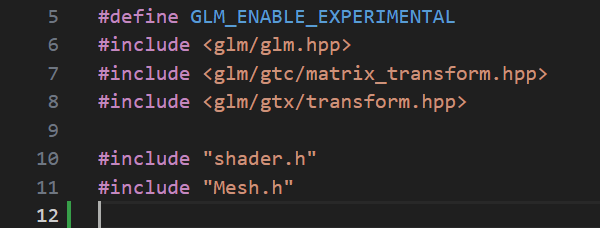
in main.cpp, first include mesh.h
## Add a function initShader()
```cpp
// Initialize shader
void initShader(std::string pathVert, std::string pathFrag)
{
shader.read_source( pathVert.c_str(), pathFrag.c_str());
shader.compile();
glUseProgram(shader.program);
}
```
## Call initShader() and new a Mesh object in main()
comment out initTriangle(), add the following before that
### initShader()
```cpp
// use the following if you are using Visual Studio
// initShader( "shaders/colour.vert", "shaders/colour.frag");
initShader("../shaders/colour.vert", "../shaders/colour.frag");
```
### new a Mesh
After that new a Mesh objet and use it to load your model.
You need to use your own path of your model.
```cpp
initShader( "shaders/colour.vert", "shaders/colour.frag");
std::shared_ptr pMesh = std::make_shared();
pMesh->init("models/teapot.obj");
//initTriangle();
```
## Call pMesh->draw()
In the main GLFW rendering loop, replace drawTriangle() with Mesh::draw()
```cpp
while (!glfwWindowShouldClose(window))
{
glfwPollEvents();
glClear(GL_COLOR_BUFFER_BIT | GL_DEPTH_BUFFER_BIT);
// drawTriangle();
pMesh->draw();
glfwSwapBuffers(window);
}
```
Now you are going to see a teapot like this
## Full Source Code
```cpp
#include
#include
#include
#define GLM_ENABLE_EXPERIMENTAL
#include
#include
#include
#include "shader.h"
#include "Mesh.h"
#include "Node.h"
static Shader shader;
// Initialize shader
void initShader(std::string pathVert, std::string pathFrag)
{
shader.read_source( pathVert.c_str(), pathFrag.c_str());
shader.compile();
glUseProgram(shader.program);
}
int main()
{
GLFWwindow *window;
// GLFW init
if (!glfwInit())
{
std::cout << "glfw failed" << std::endl;
return -1;
}
// create a GLFW window
window = glfwCreateWindow(640, 640, "Hello OpenGL 3", NULL, NULL);
glfwMakeContextCurrent(window);
// loading glad
if (!gladLoadGLLoader((GLADloadproc)glfwGetProcAddress))
{
std::cout << "Couldn't load opengl" << std::endl;
glfwTerminate();
return -1;
}
initShader( "shaders/colour.vert", "shaders/colour.frag");
// loading mesh models
std::shared_ptr pMesh = std::make_shared();
// load the model
pMesh->init("models/teapot.obj", shader.program);
// setting the background colour, you can change the value
glClearColor(0.25f, 0.5f, 0.75f, 1.0f);
glEnable(GL_DEPTH_TEST);
// setting the event loop
while (!glfwWindowShouldClose(window))
{
glfwPollEvents();
glClear(GL_COLOR_BUFFER_BIT | GL_DEPTH_BUFFER_BIT);
// drawTriangle();
pMesh->draw();
glfwSwapBuffers(window);
}
glfwTerminate();
return 0;
}
```